How to Import GSTR-2A into Tally-| Fastinflow Excel to Tally Software
Import GSTR-2A into Tally Without Manual Data Entry
Manual data entry is time-consuming, repetitive, and often leads to GST calculation errors, duplicate entries, and missing ledgers. With Fastinflow Excel to Tally Software, you can import your complete GSTR-2A Excel file into Tally Prime in just 3 minutes.
No copy-paste. No repetitive mapping.No manual ledger creation. Just a few clicks, and your data is ready in Tally.
Why Import GSTR-2A into Tally?
Every accountant and business needs to record purchase transactions correctly for GST compliance.However, importing GSTR-2A manually involves: Copying thousands of rows Creating ledgers manually . Matching party names , Calculating GST, Correcting mistakes
This process can easily take several hours. Fastinflow automates the entire process.
What is Fastinflow Excel to Tally Software?
Fastinflow is a powerful automation software that allows you to import Excel data directly into Tally. It supports importing:
Sales, Purchases,
GSTR-2A
GSTR-2B
Bank Statements
Receipts\Payments
Journal Entries
Credit Notes\Debit Notes
Inventory
E-commerce Data
Bulk Ledger Creation
Thousands of accountants, tax consultants, and businesses use Fastinflow to save time and reduce manual work.
Watch the Complete Video Tutorial
📺 Learn the complete process by watching our YouTube tutorial:
How to Import GSTR-2A into Tally in Just 3 Minutes
https://youtu.be/u7Aa4uaxCsY
Step-by-Step Guide to Import GSTR-2A into Tally
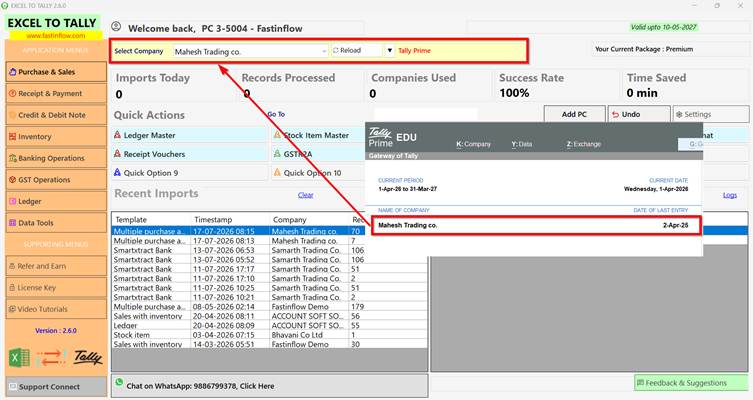
Step 1 – Open Fastinflow Excel to Tally Software
Launch the software.
The currently opened Tally company connects automatically.
Simply verify that the correct company is connected.
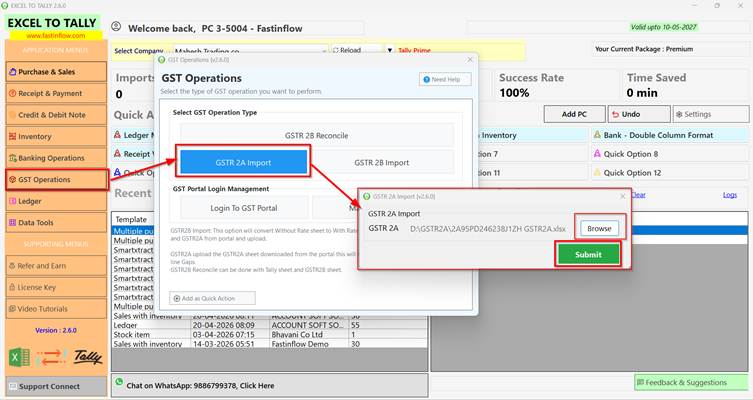
Step 2 – Select GSTR-2A Import
Click GST Operations
↓
GSTR-2A Import
Now browse your downloaded GSTR-2A Excel file.
Click Submit.
Within a few seconds, Fastinflow automatically processes and arranges the data.
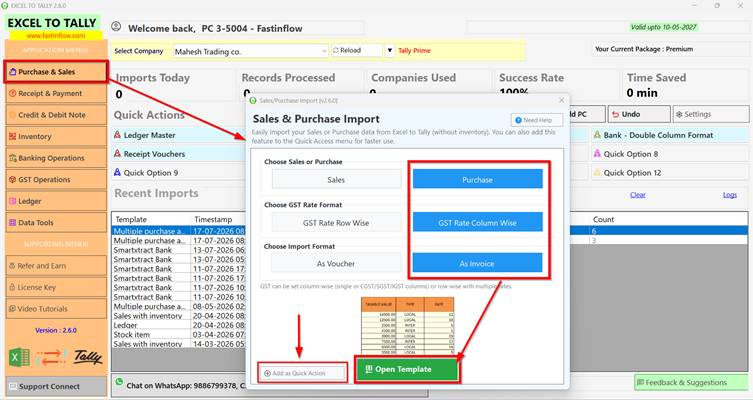
Step 3 – Open the Purchase Template
Go to
Purchase & Sales
Open the Purchase Import Template.
You can also click Add as Quick Action so the template appears directly on your dashboard for faster access in the future.
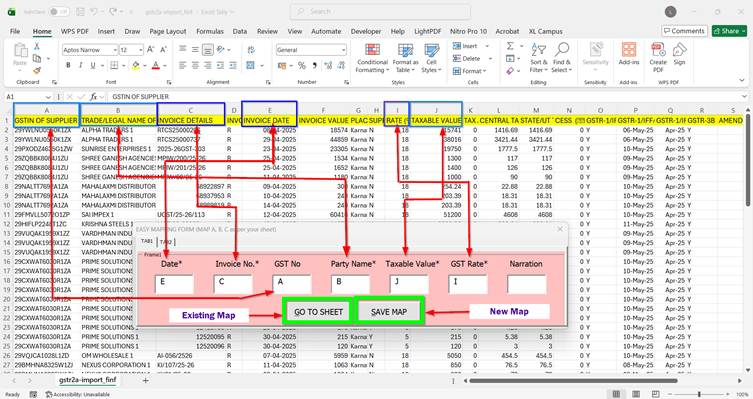
Step 4 – One-Time Mapping
Fastinflow only requires mapping once.
Simply map:
Date
Invoice Number
GST Number
Party Name
Taxable Amount
GST Rate
Click Save Map.
Give the mapping any name for future use.
The next time you import the same Excel format, simply click Go to Sheet.
No need to map again.
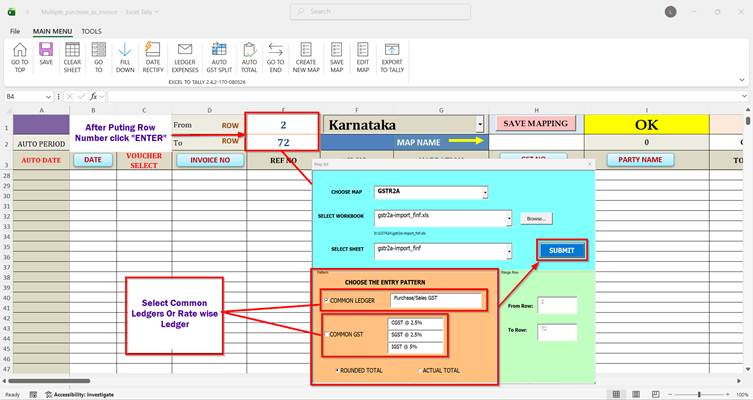
Step 5 – Select Row Numbers
Enter the starting and ending row numbers of your data.
Example:
Start Row: 2 End Row: 72
Click Next.
– Choose Ledger Option Select your preferred option:
Common Ledger
GST Percentage-wise Ledger
Click Submit.
Step 7 – Automatic Data Preparation
Now Fastinflow does everything automatically. The software: Organizes your data
Calculates GST
Applies Round Off
Prepares vouchers
Validates records
No manual editing required.
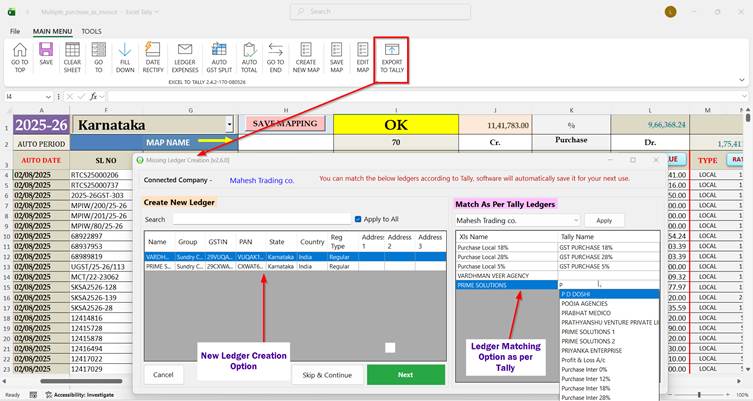
Step 8 – Export to Tally
Click
Export to Tally
Before importing, Fastinflow automatically:
Detects missing ledgers
Creates missing ledgers
Matches existing ledger namesImports complete data into Tally
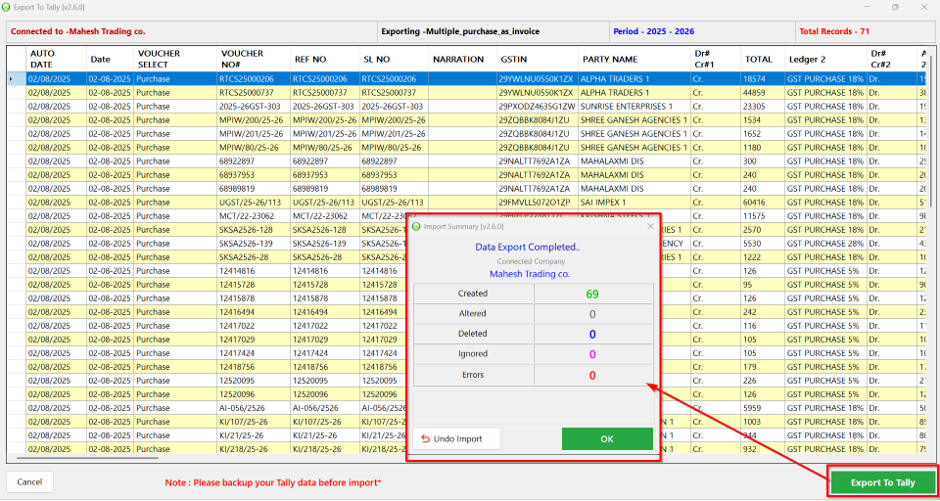
Within seconds, your GSTR-2A is successfully imported.
Powerful Features of Fastinflow
✅ One-Time Mapping
Map your Excel format only once.
Reuse the same mapping forever.
✅ Auto Missing Ledger Creation
Missing ledger?
No problem.
Fastinflow automatically creates it during import.
✅ Auto Ledger Matching
Already have a ledger with a different name?
Fastinflow intelligently matches it with your existing Tally ledger.
✅ Automatic GST Calculation
Even if GST values are missing, the software calculates them automatically based on the applicable GST rate.
✅ Automatic Round Off
No need to calculate round-off manually.
Everything is handled automatically.
✅ No Copy-Paste
Simply upload your Excel file.
Fastinflow handles the rest.
✅ Undo Import
Imported incorrect data?
Undo the entire import with a single click.
Benefits of Using Fastinflow
✔ Import GSTR-2A in just 3 minutes
✔ Save hours of manual work
✔ Reduce accounting errors
✔ No repetitive mapping
✔ Improve productivity
✔ Easy for beginners
✔ Suitable for Tally Prime
✔ Accurate GST calculations
✔ Automatic ledger management
✔ Professional accounting automation
Frequently Asked Questions (FAQs)
Can I import GSTR-2A into Tally Prime?
Yes. Fastinflow fully supports importing GSTR-2A data into Tally Prime quickly and accurately.
Do I need to map the Excel sheet every time?
No. Fastinflow saves your mapping. For future imports, simply click Go to Sheet and reuse the saved mapping without mapping the same Excel sheet again.
Can Fastinflow create missing ledgers automatically?
Yes. Fastinflow automatically detects missing ledgers and creates them before exporting data to Tally.
Can I match my existing Tally ledger names?
Yes. If your ledger names are different, Fastinflow allows you to match them with your existing Tally ledgers before import.
Does Fastinflow calculate GST automatically?
Yes. The software automatically calculates GST, prepares bill totals, and applies round-off during the import process.
Can I import invoices with multiple GST rates?
Yes. Fastinflow supports invoices containing multiple GST rates and automatically calculates GST for each rate while preparing the voucher.
Can I import large GSTR-2A Excel files?
Yes. Fastinflow supports importing large Excel files containing thousands of purchase transactions without compromising speed or accuracy.
Which versions of Tally are supported?
Fastinflow supports Tally Prime and enables seamless Excel-to-Tally imports for GST transactions.
Who can use Fastinflow Excel to Tally Software?
Fastinflow is ideal for Chartered Accountants (CAs), Accountants, GST Practitioners, Tax Consultants, Businesses, SMEs, Freelance Bookkeepers, and Tally Prime users.
Download Fastinflow Today
Stop wasting time on manual data entry.
Automate your accounting with Fastinflow Excel to Tally Software and import GSTR-2A into Tally quickly, accurately, and effortlessly.
🌐 Website
www.fastinflow.com
📞 Call / WhatsApp
9886799378